Tuesday, July 2, 2013

វិធី​តម្លើង​ខ្មែរ​យូនីកូដ​លើ Galaxy Note 10.1 (GT-N8000)

jelly-bean-ota
នៅជំនាន់​ថ្មីៗ​ចុង​ក្រោយ​របស់ Samsung បាន​បង្កលក្ខណៈ​ងាយ​ក្នុង​ការ​តម្លើង​ពុម្ពអក្សរ​យូនីកូដ​ ដោយ​មិន​ចាំ់​បាច់ root។ យើង​ក៏សូម​ថ្លែង​អំណរគុណដល់លោក​ ដាញ់ ហុង ដែល ​បាន​បង្កើត​នូវ​ពុម្ព​អក្សរ និង​កម្មវិធី  Khmer.apk ដែល​សំរាប់​ប្រើ​ប្រាស់​តម្លើង​ដាក់​ទូរស័ព្ទ Samsung និង Android ផ្សេងៗ​ទៀត​ដែល​ប្រើប្រាស់​ flipfont។
ជំហ៊ាន​ខាងក្រោម​គឺជា​វិធី​ដែលប្រើ​សំរាប់​តម្លើង​ពុម្ពអក្សរ​ខ្មែរ​យូនីកូដ​ដាក់​លើ Galaxy S advance៖
  1.  បន្ទាន់​សម័យ​ទៅ Jelly Bean 4.1.2
    • លោក​អ្នក​ត្រូវ​តែ​ upgrade ទូរស័ព្ទ​របស់លោក​អ្នក​ទៅ​កាន់ Android 4.1.2 តាម​វិធី​ខាងក្រោម៖
      •  ពន្លាវាទុកមួយឡែក
      • ទាញយក Odin
      • តម្លើងdriver (បើសិនជាមិនទាន់មាន)
      • បិទទូរស័ព្ទ
    • បើកវិញដោយចុចVol Down + Home + Power
    • បន្ទាប់មកវានឹងចេញការបញ្ជាក់បន្ថែម (សូមចុចVol up)
    • ជាបន្តវានឹងចេញពាក្យថាdownloading…
    • ភ្ជាប់វាទៅនឹងកុំព្យូទ័រ
      • បើកកម្មវិធី odin
      • បើសិនស្គាល់នោះវានឹងចេញនូវពណ៌លឿងក្នុង textbox ព្រមជាមួយនឹងលេខ port
      • ចុចប៊ូតុង PDA
      • ជ្រើសយកfirmware ដែលបានពន្លានៅក្នុងជំហ៊ានទី៣
      • ចុចប៊ូតុង start
      • រងចាំមួយសំទុះ នោះវានឹងតម្លើងដោយខ្លួនឯង
  2. បន្ទាប់​ពី​តម្លើង ទៅកាន់ Jelly Bean ហើយ​សូម​ទាញយក Khmer.apk
  3. តម្លើង Khmer.apk តាម​ធម្មតា (ចំលងចូល sdcard ហើយ​តម្លើង)
  4. ចូល​ទៅកាន់ Settings => Display => font style => Khmer
លោក​អ្នក​អាច​មើល​និង​សរសេរ​ខ្មែរ​បាន​ហើយ​(សូមបញ្ជាក់​ផង​ដែរ​ថា​វា​នឹង​មិន​អាច​ប្រើ​បាន​នៅលើ Browser របស់​ Samsung បាន​ទេ។ ដូច​នេះ​បើ​ចង់​មើល​គឺ​ត្រូវ​តែ​ root។)

Xperia Miro ST23I 4.0.4 Full Khmer Unicode

I-ឯកសារ 1-Unlock Root    http://www.mediafire.com/download.php?3g31e4jijvj397j 2-Font           http://www.mediafire.com/download.php?0701lvcr8no9uvs 3-Root Explorerhttp://www.mediafire.com/download.php?qf9fkd24lm9cm9nសម្រាប់ Firmware ទុកបង្កា ពេលមានបញ្ហា Flash វិញ     https://doc-0s-1o-docs.googleusercontent.com/docs/securesc/nkvm7e1si57pkvjeb7usjs79bhj6pue1/v065d1fhebbiknqb1ko6rojg3j94idb5/1368338400000/13194687144113026389/00595906907374146273/0B_d8uWGbkaetR1ZuSWlUcTNNQVk?e=download&nonce=1pe90skg6evpe&user=00595906907374146273&hash=8f8egagejl87fomvqnoktfbufgo5fsj5


II-វិធីធ្វើ


1- go to setting tick debug and unkwon source  2- Open Unlockroot.exe >Click Root finnish reboot and find supersu នៅក្នុងទូរស័ព្ទអ្នកបើមានបានន័យថា Rootបានសម្រេចហើយ 3- Intsall root explorer.apk to phone 4- Replace font  reboot Finnishរបៀបខាងលើនេះសម្រាប់ ICS 4.0.4 តែប៉ុណ្ណោះ (បើទូរស័ព្ទរបស់លោកអ្នកមិនឋិតនៅលើ ជំនាន់ ICSទេ ត្រូវទាញយក Firmware ខាងលើមក Flash 1 សិន

KU5900 convert to P970 and install Khmer Unicode

 
ទាញយកទីនេះ
 ១ ពន្លាហ្វាល់ដែលបានទាញ 
២ បើកSFT->install Windows Enabler->on 
៣ បើក smart flashtool->ROM copy DL->ចុចយក AP bin->ទាញយក firmware(convert ku5900 to p970) 
៤ ចូលdownload mod (off phone->volume up and connect usb)->Start 
៥ រងចាំរហូតចប់ម៉ាសីនរីស្តាតចូលរីខៅរីម៉ូដដោយស្វ័យប្រវត្ត 
៦ copy playstore p970 and rom jellybean p970 and khmerkeybord to memorycard 
៧ install zip from sdcard (install rom jellybean and playstore p970) ->factoryreset->reboot 
៨ ដំឡើងខ្មែរឃីបត (ចប់) 
#ទទួលខុសត្រូវរាល់ការខូចខាតដោយខ្លួនឯង 
ដោយបង ឡេន-សុធា រតនះគីរី 
ដែលបានចែករំលែកក្នុងក្រុម ANDROID RATANAKIRI

តម្លើង Android 4.3 នៅលើ Galaxy S4 (GT-I9505)

Screenshot_2013-06-28-10-34-451

កាលពី​លើក​មុន​គឺ​មានលេច​ចេញ​នូវ Android 4.3 តែ​មិន​មែន​នៅក្នុង​សន្និសីទ Google I/O នោះ​ទេ។ វា​បែជា​ចេញ​នូវ​ក្នុង​ព្រឹតិ្តការណ៍​មួយ​ក្នុង​ប្រទេស​សៀម​ទៅ​វិញ។ បន្ទាប់​មក​វាហាក់​ដូចជា​ស្ងាត់​បន្តិច​នូវ​ពត៌មាន​ផ្សេងៗ​ដែល​ទាក់​ទង​នឹង Android ជំនាន់​ចុង​ក្រោយ​បំផុត​នេះ។
បន្ទាប់​ពី​ការ​ចេញ​លក់​នូវ Galaxy S4 និង HTC One ដែល​ប្រើប្រាស់​កម្មវីធី​ផ្ទាល់​ពី Google នោះ​ គឺ​ស្រាប់​តែ Android 4.3 នេះ​បាន​លេខ​មុខ​ជាថ្មី​ម្តង​ទៀត។ មុន​នេះ​មួយ​ថ្ងៃ​គឺ​គ្រាន់​តែ​មានពត៌មាន​មិន​ទាន់​ច្បាស់​ការណ៍ តែ​នៅពេល​នេះ​លោក​អ្នក​អាច​តម្លើង​សាកល្បង​វា​ដើម្បី ប្រើប្រាស់​និង​ទទួល​យក​បទពិសោធន៍​ថ្មី​របស់ Android 4.3។
អ្វី​ដែល​កំពុង​មាន​នេះ គឺមិនទាន់​ចេញ​ជាផ្លូវ​ការ​ទូទៅ​សំរាប់​ទូរស័ព្ទ​ផ្សេងៗ​នោះ​ទេ តែ​វា​ប្រើតែសំរាប់​ Galaxy S4 (GT-I9505G) របស់ Google តែប៉ុណ្ណោះ។ តែ​វាមិន​មែន​បាន​ន័យ​ថា​យើង​មិន​អាច​ប្រើប្រាស់​បានឯណា។ អ្នក​អភិវឌ្ឍន៍​កម្មវីធី​បាន​កែច្នៃ​ដើម្បី​ឲ្យ​ firmware របស់ GT-I9505G អាច​ប្រើប្រាស់​នៅលើ GT-I9505​ធម្មតា​ដែលប្រើប្រាស់ Chip Snap-dragon បាន។


ចំពោះ​បញ្ហា​ផ្សេងៗ​គឺមិនមាននោះ​ទេ(យោង​តាម​ប្រភពពត៌មាន) ហើយ​បើសិន​ជាចង់​តម្លើង​វិញ​សូម​មើល របៀប​តម្លើង Android 4.3 នៅលើGalaxy S4 (GT-(9505)។
Screenshot_2013-06-28-10-34-371

[ចំណេះដឹង] របៀបតំឡើង​ Font ខ្មែរ​លើ​ Samsung Galaxy S4 ដោយ​មិន​បាច់​ Root

[ចំណេះដឹង] របៀបតំឡើង​ Font ខ្មែរ​លើ​ Samsung Galaxy S4 ដោយ​មិន​បាច់​ Root

មាន​របាយការណ៍​មួយ​ចំនួន​បាន​បង្ហាញ​ថា Flip Font (​ Khmer.apk )​ពេលតំឡើង​លើ​ Galaxy S4 គឺវា​មិន​អាច​ដំណើរ​ការ​បាន​ទេ។ ដូច្នេះ​ហើយ​ខាង​ក្រោម​នេះ​ យើង​ខ្ញុំនិង​បង្ហាញពី​របៀប​ដែល​អាច​ឲ្យ​ Flip Font (​ Khmer.apk )​ អាច​ដំណើរ​ការ​បាន ៖
តំរូវ​ការ​ក្នុង​ការ​អនុវត្តន៍៖
+ ទាញយក Flip Font (Khmer.apk)
របៀបធ្វើ ៖
១. ជាដំបូង​យើង​ត្រូវ​តំឡើងកម្មវិធី iFont ជាមុន​សិន (អាចទាញ​យក​ Free ពី​ Play Store)
២. បន្ទាប់មក​ធ្វើ​ការ​តំឡើង Flip Font (​ Khmer.apk )​ដែល​បាន​ទាញយកពីខាងលើ
៣. ពេល​តំឡើង​ហើយ​ ចូល​ទៅ​កាន់ Setting => Display => Font Style ធ្វើ​ការ​ជ្រើស​ Font ណា​មួយ​ដែល​ក្រៅពី Default Font និង Khmer Font
៤. ហើយ​បើក​កម្មវិធី​ iFont ហើយ​ចុច​លើ​ Tab Install បន្ទាប់​មក​ទៀត​ ជ្រើស​យក​ Khmer ហើយ​ចុច​ Set រួចជា​ការ​ស្រេច។
ឥឡូវ​សូម​សាកល្បង​​អនុវត្តន៍​ទាំង​អស់​គ្នា!!!! :-)

[ព័ត៌មាន] Semi-Restore បានបញ្ជេញហើយ សម្រាប់ Mac និង PC

Semi-Restore គឺជា ដំណោះស្រាយមួយសម្រាប់ iPhone, iPad, និង iPod touch ដែលអាចអោយលោអ្នក លុប​ឯកសារ​ក្នុងឧបករណ៏របស់អ្នក ហើយត្រឡប់​មើលទៅដូចថ្មី ដោយមិនបាត់បង់ការ Jailbreak។
បានបង្កើតឡើងដោយ CoolStar។ ដំណើរការគឺនឹង Restore ឧបករណ៏របស់អ្នកដែលដំណើរការដោយ iOS 5.0 រហូតដល់ 6.1.2 ទៅដូចនឹងថ្មី ទើបតែនឹង Restore​ អញ្ជឹង។ វាជា​កម្មវិធី​មួយមាន​លក្ខណៈសមាញ្ញ ដោយគ្រាន់តែចុចម្តងប៉ុនោះ។ កម្មវិធីនេះបានបញ្ជេញមកសម្រាប់ Mac, Windows និង Ubuntu ផងដែរ។
តើកម្មវិធីនេះនឹងធ្វើអ្វីខ្លះ?
● លុបចោលនៅកញ្ជប់កម្មវិធីទាំងអស់នៅក្នុង Cydia
● កែនូវឯកសារ host នៅពេលមានបញ្ហា
● លុបឯកសារអ្នកប្រើប្រាស់ទាំងអស់
● កែនូវ permissions
● កែនូវ activation ពេលមានបញ្ហា
● កែនូវ iMessage/Facetime
● កែនូវ Safe mode ពេលមានបញ្ហា ដែលតែងតែលេចឡើង
● តម្លើង Cydia ឡើងវិញ (ជាការពិតវាបានលុបចោលពេលកម្មវិធីកំពុងដំណើរការ)
ហើយតើកម្មវិធីនេះនឹងមិនធ្វើអ្វីខ្លះ?
● Upgrade iOS របស់អ្នក ទៅស៊េរីថ្មី
● Downgrade iOS របស់អ្នក ទៅស៊េរីចាស់
● Jailbreak iOS របស់ឧបករណ៏លោកអ្នក
● កែនូវ ឯកសារ System ដែលខូតខាត
ចំណាំ:
● SemiRestore ដំណើរការបានពី Windows XP SP3 ឫក៏ ខ្ពស់ជាងនេះ, OS X 10.6 ឫក៏ ខ្ពស់ជាងនេះ, និង Ubuntu 12.10 ឫក៏ ខ្ពស់ជាងនេះ (ឬសមមូលនៃ Linux) ។
● ប្រហែលជាមានដំណោះស្រាយខ្លះដើម្បីដោះស្រាយបញ្ហារបស់អ្នក។ ដូចជា កែនូវបញ្ហា “Safe Mode” អ្នកអាចលុបចោលនូវ Mobile Substrate ចេញ​ពី Cydia។
● សូមធ្វើការរក្សាទុកនៅឯកសាររបស់អ្នក បើអ្នកចង់ប្រាស់ឯកសារទាំងនោះពេលក្រោយទៀត។
● កុំព្យាយាមប្រើ ឧករណ៏របស់អ្នក ឫក៏ អ្វីផ្សេងៗទៀតដែលទាក់ទងទៅនឹង iTunes ឫក៏ XCode នៅពេលកម្មវិធី Semi-Restore កំពុងដំណើរការ។
● ដំណើរការនេះមិនទៅ កែឯកសារ system នោះទេ។
● ឧបករណ៏របស់អ្នកនឹង ធ្វើការ respring ឫ reboot ខ្លះៗក្នុងកំឡុងពេល ដំណើរការ Semi-Restore។
អ្នកអាចទាញយកបាននូវ កម្មវិធី Semi-Restore នេះបានដោយ ចុចទីនេះ។
សូមចងចាំថា កុំភ្លេច backup ឯកសាររបស់អ្នកមុននឹងប្រើកម្មវិធីនេះ។
ប្រភពពី៖ http://semi-restore.com/

Monday, July 1, 2013

HOW TO ROOT SAMSUNG SGH-I997R GALAXY S INFUSE 4G OS GIGERBREAD AND INSTALL KHMER UNICODE

I.តំរូវការ
1. firmware I997UCLB3-CWM-root-deodex.rar.(ទាញយករួចពន្លាវា)
2. Update.zip  (ទាញយករួចចំលងចូលម៉េម៉ូរី)
3. Custom rom JB 4.2.2  (ទាញយករួចចំលងចូលroot folderដែលនៅក្នុងម៉េម៉ូរីកាត)
4.Google apps.zip (ទាញយករួចចំលងចូលroot folderដែលនៅក្នុងម៉េម៉ូរីកាត)
5. Driver Windows 32-bit (x86)  | Windows 64-bit (x64) (តម្លើងដាក់កំព្យូរទ័រ)
6.Odin (ទាញយករួចពន្លាវា)
4. Khmer full JB.zip (ទាញយករួចចំលងចូលម៉េម៉ូរី)

II. អនុវត្ត Rooting&CWM


1. ទាញយFirmware I997UCLB3-CWM-root-deodex.rarរួចពន្លា
2. សេរ៉េ Usb Enable debugging mode​​(Setting>developer options) &Enable unknow
3. បិទទូរស័ព្ទ( no connect phone to pc)
4. Boot in to recovery ចុចបូ៑តុងបន្ថែមសំឡេង​បន្ថយសំឡេង បន្ថយសំឡេង+power(ពេលតែមួយ)​ ពេលស្កិតក្នងrecovery សូមដកដៃចេញទាំងពីរបូ៑តុង
5. in recovery សូមធ្វើការwipe all user data&wipe cache theb reboot your phone.
6.បើកកម្មវិធីOdin
7.ដោះថ្មចេញពីទូរស័ព្ទ-->ភ្ជាប់វាទៅនឹងកំព្យូរទ័រដោយខ្សែរusb-->ដាក់ថ្មចូលទូរស័ព្ទវិញ-->ចុចបូ៑តុងបន្ថែមសំឡេង​បន្ថយសំឡេងដើម្បីឲទូរស័ព្ទស្ថិតក្នុងdownload mode (ត្រង់ចំនុចID comមានពណ៌លឿងឬត្រង់ចំនុចmessage លេចចេញអក្សរadded បានន័យថាស័ព្ទបានភ្ជាប់ជាមួយកំព្យូរទ័ររួចហើយ)។

8.ចុចOdin.exe-->PDA-->I997UCLB3-CWM-root.tar-->start ទូរស័ព្ទនឹងដំនើរការតម្លើងរួចរីស្តាតដោយខ្លួនវា។
9.បន្ទាប់ពីទូរស័ព្ទរីស្តាតសូមដកខ្សែរUSBចេញរូចបិទទូរស័ព្ទម្តងទៀត
10.Reboot to Clockwork mod (ដោយចុចបូ៑តុងបន្ថែ+power+menu)-->Apply update from SD card-->update.zip-->yes-->go back--> reboot yr phone.

III. ការតម្លើងទៅកាន់កំរិត4.2និងពុម្ពអក្សខ្មែរ
1.ទាញយកcustom rom និង​Google apps  Khmer full JB.zip &  MultiLing Keyboard 
 រួចចំលងចូលfolder rootដែលស្ថិតក្នុងម៉េម៉ូរីកាតរឺម៉ាស៊ីន
2.បិទទូរស័ព្ទ( no connect phone to pc)
3.boot to clockwork mod (ដោយចុចបូ៑តុងបន្ថែ+power+menu)
4.សូមធ្វើការwipe all user data,wipe cache &wipe dalvik cache -->install zip from sd card -->choose zip from sd card
-->cm10.1(ដែលបានទាញយកនៅចំនុច1)បន្ទាប់ពីតម្លើងហើយសូមgo back រួចចុចinstall zip from sd card -->chose zip from sd card -->gapps.zipបន្ទាប់ពីតម្លើងហើយgo back -->ចុចinstall zip from sd card -->chose zip from sd card
-->khmer full JB.zipបន្ទាប់ពីតម្លើងហើយgo back -->reboot yr phone.
5.ចុងបញ្ចប់គ្រាន់តែinstall MultiLing Keyboardដាក់ទូរស័ព្ទរួច-->go to Setting--> Language & Keyboard 
--> Tick on MultiLing Keyboard => Choose MultiLing Keyboard Setting-->Language twice-->Tick ភាសាខ្មែរ

ចំណាំ​::: Kie មិនដំណើរការទេនៅក្នុងរូមនេះ។

* I'm not responsible with yr own risk.

បានដកស្រង់ចេញពីxda-developer

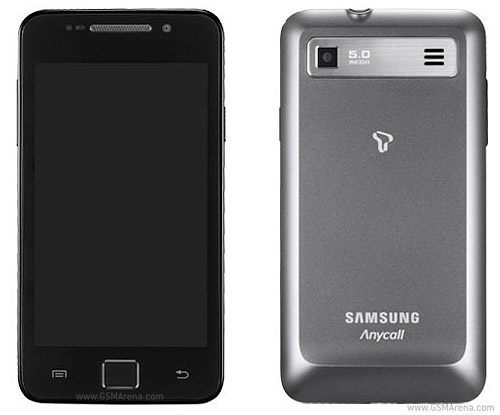
តម្លើងពុម្ពអក្សរខ្មែរលើ​SAMSUNG ANYCALL M190S


SEMI RESTORE RELEASE

                                              Download for  Windows    OS X    SSH 

Requirements

  • 5-10 minutes of your time!
  • A computer running Windows or Mac OS X

 Read this or you may regret it!

  • SemiRestore supports Windows XP SP3 or higher, OS X 10.6 or higher, and Ubuntu 12.10 or higher (or the equivalent Linux).
  • There may be a better way to fix your current problem. For example, to fix "Safe Mode" issues, you can just uninstall Mobile Substrate from Cydia.
  • Like any other restore, make sure you backup your data if you want it later.
  • Avoid using your iOS device or anything related to iTunes or XCode during the Semi-Restore. Why not actually go outside?
  • This process can not and does not repair broken system files! Avoid all Siri Ports, as they are not only illegal (except for Spire on 5.0.1) but they also create problems and may potentially break system files (even Spire can cause this).
  • Your device will respring or reboot several times during the Semi-Restore. This is perfectly normal, so don't panic.

for view more please read more

HOW TO ROOT XPERIA SOLA AND INSTALL CWM RECOVERY

Sony-Ericsson-XPERIA-Arc-cwmI. របៀបRoot

1. ចុចទីនេះដើម្បីទាញយករួចពន្លាវា(Extract files)
2. Extract files from the archive to your Desktop.
3. បើកUSB
debuggingដោយចុច Menu>>Settings>>Developer options>>USB debugging​
4. ភ្ជាប់ទូរស័ព្ទជាមួយកំព្យូរទ័រ

5. ចុច double-click on RunMe.bat ដែលបានពន្លា
6. ជ្រើសយក​1
7. ជ្រើសយក Root 
8. ធ្វើតាមការណែនាំនៅលើផ្ទាំងកម្មវិធី
9.check Superuser in your phone if have on menu is Done!!

II. តម្លើង ClockworkMod Recovery  Sony Xperia Active:

1. ចុចទីនេះដើម្បីទាញយករួចពន្លាវា(Extract files)
2. បើកUSB debuggingដោយចុច Settings > Applications > USB Debugging (ប្រសិន Android 2.3) ឬ going to Settings > Development (Android 4.0) and ticking the USB Debugging .
3. ភ្ជាប់ទូរស័ព្ទជាមួយកំព្យូរទ័រ 
4. ចុច double-click on Recovery x ដែលបានពន្លា
5. ជ្រើសយកSony Ericsson ពីក្នុងBrand  ជ្រើសយក Xperia Active ពីក្នុងDevice ជ្រើសយក Recovery​
ចុច CWM Recovery 5.0.2.7 (Android 4.0)រួចចុចNext
6.រងចាំRecovery X 2 or 3 នាទី

Tuesday, June 25, 2013

រៀបកប្រែFramwork-rea.apk

TRANSLATE ANDROID SYSTEM APKS INTO KHMER

20120331_142039

Concept:
  1. Use apktool to decompile the android system files.
  2. modify the resources in res folders
  3. recompile them back.
  4. replace resources.arsc and other xml and images resources with the modified one using winrar make sure you save it in zip format and “store” as compression method.
  5. when replacing the framework-res.apk in your phone with modified framework-res.apk. make sure you set the permission to all 777.


+Translate Framworks-res.apk


step 1: extract your Apktool to c:\apktool (note: I use the original apktool, not the ICS one)
step 2: extract frameworks-res.apk from your phone located in /system/frameworks/ using Root Explorer to copy it to your sdcard, and transfer the file on to your desktop.
step 3: copy the frameworks-res.apk from your desktop to the same folder as apktool which is c:\apktool in this example. (now you should have 2 copies of frameworks-res.apk, one on your desktop and one in c:\apktool folder)
step 4: go to command prompt (run command prompt, if you don’t know just google it ), and type following commands (as shown in the photo above)
cd c:\apktool
apktool if frameworks-res.apk
apktool d framworks-res.apk
At this point, don’t close the command prompt windows. Go to c:\apktool you will seeframework-res folder.
Now you can start translating files in res folder of the framework-res. (Please read how to translate an apk file here for more info)
…………
………….
Ok, now I assume that you have completed the translation. So, let’s rebuild the frameworks-res using the command below.
apktool b frameworks-res
Once it’s done. you find framework-res.apk in C:\apktool\framework-res\dist folder
Let’s put translated resources into the original framework-res.apk
The main different between translating an apk and a kernel system file is that you cannot re-sign the apk, it will brick your phone. To solve this problem you need to transfer the translated resources into the orignal system file (in here, frameworks-res.apk).
Note:
Blue colour framework-res.apk = the translated framework resource apk.
Red colour framwork-res.apk = the original framework resource apk on desktop.

Step 1:
- open the modified framework-res.apk in C:\apktool\framework-res\dist folder with winrar
- extract resources.arsc or other resources that you modified such images from the drawable-hdpi onto desktop folder.
Step 2:
- Open the original frameworks-res.apk that you first saved on desktop with winrar.
- drag the modified resources.arsc that you just extracted from the modified frameworks-res.apk to replace the original resources.arsc in the original frameworks-res.apk on the desktop. make you sure save in zip format and “store” as compression method
- replace other original xml and images resources with the modified xml and images files one using the same method as replacing resource.arsc
Step 3: make you sure save in zip format and “store” as compression method.
Step 4: install copy the frameworks-res.apk from your desktop to your phone.
WARNING!: Make sure you backup your phone first.
This is the tricky bit.
1. First, you need to copy it into /system/ folder of your phone first. (don’t skip this step)
2. Then, change the permission to 777. Refer to below image. (user, group, other, all read, write, execute). That’s the only permission that works for me.
3. restart your phone. If everything goes well, you can boot into you home screen. otherwise. you just bricked your phone, and need to restore it from backup. and try it again. :)
Done!
If you want to translate setting menu, then you need to translate settings.apk.


+ Translating settings.apk


(Note: errors are only for Samsung Galaxy S2 Android MIUI ROM 2.3.2b, if you not using this ROM don’t worry about this )
Pretty much the same step as translating frameworks-res.apk
  1. copy settings.apk from phone to desktop. And make another copy from desktop to c:\apktool\, make you that you have frameworks-res.apk in the same folder as well.
  2. run command prompt:
cd c:\apktool
apktool if frameworks-res.apk
apktool d settings.apk
 ————————————————–
[update 07/07/12] compile settings.apk errors due to missing dependency framework files.
+ Sony Xperia Arc
To compile Sony Xperia Arc settings.apk you need to install 2 frameworks file: framework-res.apk and semcgenericuxpres.apk (should be in system/framework folder)commands:apktool if framwork-res.apk
apktool if semcgenericuxpres.apk
apktool d settings.apk
apktool b settings
+ Samsung (using touchwiz framework)
you need to install framework-res.apk and twframework-res.apk
+ HTC
you need to install framework-res and com.htc.resources.apk
+ Others
you may need to install SystemUI.apk as well to compile the settngs.apk
——————————————————
3. find the settings folder in c:\apktool\ and start translating the resources in settings folder.
If you don’t know how, read this
4 now, rebuild the settings.apk using command prompt:
apktool b settings
Now, you should have a modified settings.apk in C:\apktool\settings\dist
The same as frameworks-res.apk
  1. exract resources.arsc (or other xml file in res\xml folder) from the modified settings.apk.
  2. replace resource.arsc (or other xml file) to the original settings.apk
  3. copy the original setting.apk (but with the modified resource.arsc) to /system/ on your phone, change permission, then copy to /system/app (this one doesn’t need 777 permission, just user: read write, group: read, others: read)
  4. restart your phone.
Done!

+ Translate Android stock applications
Translate Android stock application (such as desktopclock, music, camera, gallery)  and normal Android apk are pretty much the same.  But when you install it, you need to use RootAppDelete to delete the stock app
  1. Click on SysApp button, disable the apk (example, deskclock.apk)
  2. play with your phone, if it stable, then to go Recycler of RootAppDelete to uninstall it
  3. install the translated apk file (signed-deskclock.apk) to replace it.

Sunday VCD Vol 185 | Khmer MV 2017

Sunday VCD Vol 185 | Khmer MV 2017 Tracklist :  01. Neuk Kloun Eng (Eva)  |  Download 02. Aroam Chhkout Lorb (Jame)  |  Download 03....