Thursday, March 13, 2014

ios 7.1 khmer


This quide will help you to get Khmer font on iOS 7.1 all iPhone, iPad iPod and possible support on programs(Facebook, Youtube, Music,….) but not work on Safari browser.


Ok go now and pls choose only one which you prefered that i just collect from our Fri and combine with my own font (SinFu Font)

1. Open this Website/Blogspot on your iOS7 devices (iPhone, iPad, iPod) with Safari :
a) Recommend Font:
b) Other Font:
Note: Make sure have only one Font in profile !! if another font could not see khmer full i recommend strongly pls install only Sin Fu Font or 4ki, Every restart or reboot you might to install it again!!

2. Click Install and Done

3. If you want to install another Font Style you have to remove the previous profile fonts that you install
Go Settings —> General —> Profile   remove profile Font that you install on your device.

Tuesday, March 11, 2014

របៀប Updates Galaxy Note2 (GT-N7100) to jellybean 4.3 តាម​ CWM

 
សួរស្តី :D  ថ្ងៃនេះកូនខ្មែរអាប់ដេត សូមលើកយកអំពី របៀប Updates Galaxy Note2( GT-N7100) ទៅ​Version 4.3 តាម CWM Recovery យ៉ាង​ងាយស្រួល។

ទាញយកឯកសារត្រូវការ
របៀបធ្វើ
  • បិទទូរស័ព្ទហើយចុច Home + Vol down + Power រង់ចាំរហូតវាលោតផ្តាំងមួយរួចចុច Vol up​នោះទូរស័ព្ទកំពុងស្ថិតក្នុង Download mode
  • ភ្ជាប់ទូរស័ព្ទជាមួយកុំព្យូទ័រ រួចបើកកម្មវិធី Odin3.07 រួចចុចលើពាក្យ PDA ស្វែង​រក​ File ដែល​​ បាន Download មកឈ្មោះ philz_touch_5.15.0-n7100.tar.md5 រួចលើពាក្យ Start រង់ចាំវា​ដើរ​ចប់។
  • Copy  N7100XXUEML3_zmx8038_V2.6.zip ចូលក្នុង SD Card រូចចុចចូលCWM Recovery ដោយបិទទូរស័ព្ទ រួចចុច Vol up + Home +Power រហូតចេញភ្លើង LED អ្នកត្រូវផ្អាកការចុច​ទាំងអស់។
  • នៅពេលដែលទូរស័ព្ទអ្នកចូល Recovery ហើយអ្នកអាច Updates បានតាម CWM Recovery ដោយ​គ្រាន់តែធ្វើតាមយើងដូចខាងក្រោម:
  1.  ចុច Wipe data/Factory reset ==>Yes -delete all user data==>++++Go Back++++
  2. ចុច Wipe cache partition ==> Yes- Wipe Cache==>+++Go Back+++
  3. ចុច Advenced ==> Wipe Daivik Cache ==>+++Go Back+++
  4. ចុច Install Zip ==> Choose Zip From SD card ==> N7100XXUEML3_zmx8038_V2.6.zip==>​Yes-Install  N7100XXUEML3_zmx8038_V2.6.zip ==> +++Go Back+++==>Roboot System Now.
  5. រង់ចាំ រហូតដំណើរការចប់វានឹងឡើងទៅ Jellybean 4.3 នឹងមាន Style យ៉ាង​ស្អាត
សូមមើល Screenshots 


៙សូមជោគជ័យក្នុងការអនុវត្តន៍ នឹងទទួលខុសត្រូវដោយខ្លួនឯង៚

Monday, March 10, 2014

Install Android 4.3 Leaked Firmware on AT&T Galaxy S3, Note 2, Galaxy S4 & S4 Active

Android-4.3-for-AT&T-Galaxy
We all know that Samsung cancelled the Android 4.2.2 update for a number of its devices like the Galaxy S3, Note 2 and Note 10.1 because it was late in rolling the update. The OEM then decided to upgrade the software version of these and some other devices directly to Android 4.3. The international GSM and LTE variants of the Galaxy S4 have already received the latest version of the OS and we already have the leaked 4.3 firmware for Note 2 GT-N7100 too.
When it comes to firmware update for the Galaxy devices, it seldom happens that a new version of firmware (leaked or official) arrives to a US carrier variant. XDA member designgears has shared Android 4.3 leaked firmwares for four devices from AT&T namely the Galaxy S3 SGH-I747, Note 2 SGH-I317, Galaxy S4 SGH-I337 and S4 Active SGH-I537. If you have any of these devices and you wish to get a peek into the latest version of Android before it’s available officially, you can download the complete firmware and install it manually using Odin or Heimdall.
Having installed to the leaked test firmware on your device, you’ll notice the following changes and features:
  • Galaxy Gear support
  • New Reading Mode in Display settings and Notification toggles
  • Driving Mode now becomes Hands-free Mode
  • Improvement in Camera performance and imaging
  • New tabbed UI in Settings
  • TouchWiz launcher now has less lag and feels much faster
  • Samsung Wallet comes pre-installed
  • Improved Keyboard
  • Improvements in display color
  • Samsung Browser is now fullscreen by default
  • New firmware adds Galaxy Gear support
  • OpenGL 3.0 Support
  • ANT+ Support
  • TRIM Support
  • Better RAM management
  • Many other UI tweaks to improve performance

Warning:

Please note that the firmwares available below are test versions and therefore one should not expect perfection in performance. After installing the firmware on your Galaxy, you might discover bugs. The good thing, however, is that no user has yet reported any major bug. Installing this firmware will unroot your device and will wipe the apps and data. Therefore, we strongly recommend that you backup all important data before proceeding.  Also, install the firmware at your own risk. We do not hold any responsibility for any mishap.

Download Firmwares:

(All firmwares come with KNOX and SELinux)
AT&T Galaxy S3 SGH-I747: I747UCUEMJ2.7z
AT&T Galaxy Note 2 SGH-I317: I317UCUBMJ4.7z
AT&T Galaxy S4 SGH-I337: I337UCUEMJ6.7z
AT&T Galaxy S4 Active SGH-I537: OneClick_I537UCUBMI2.zip

For AT&T S3 Users with Root and Custom Recovery:

If you own a rooted AT&T Galaxy S3 SGH-I747 and have a custom recovery like CWM or TWRP installed on it, you can enjoy the leaked Android 4.3 ROM on your phone without losing root access and custom recovery. loserskater from XDA has repacked the leaked firmware into a flashable ROM that can be downloaded from below.
Downloads:
ROM: d2att_I747UCUEMJ2_root_noknox.zip
Also download the bootloader file: d2att_I747UCUEMJ2_bootloader_modem.zip
Before you attempt to install the ROM, make sure that your AT&T Galaxy S3 has either stock Samsung ROM, or a stock-based custom ROM. If your device meets this requirement, follow the instructions given below:
  1. Download and copy the ROM and bootloader files to your device.
  2. Boot device into recovery mode by pressing Home + Volume Up + Power buttons together for 4-6 seconds.
  3. If you have CWM on your phone, go to “backup and restore> backup to external sd” and perform the backup. In case you use TWRP, tap the “Backup” option and confirm your choice.
  4. Now go back to the main menu and select “wipe data/factory reset” (in CWM), or “Wipe” (in TWRP) and swipe the slider button with arrow to factory reset your S3.
  5. Return to main menu in recovery and install the “d2att_I747UCUEMJ2_bootloader_modem.zip” file using “install zip from sdcard” option (in CWM), or “Install” option (in TWRP).
  6. Repeat the Step 5 but this time install the ROM file “d2att_I747UCUEMJ2_root_noknox.zip”.
  7. When installation is finished, reboot your device.
  8. Wait for the phone to boot and enjoy Android 4.3 Jelly Bean!

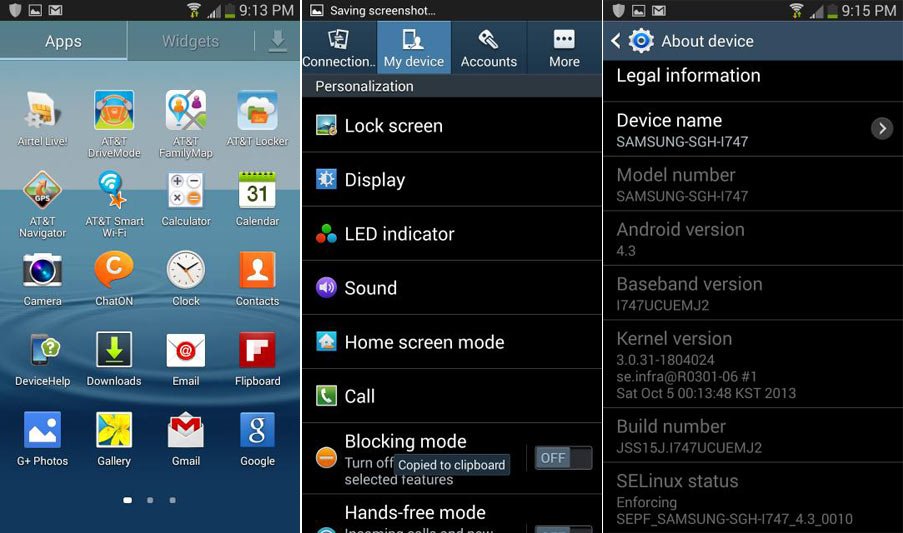
Screenshots:

The screenshots shown below have been taken on Galaxy S3, to see more screens click here.
at&t-galaxy-s3-android-4.3
Overall rating
 

Thursday, February 27, 2014

ដំឡើង Kitkat 4.4.2 សម្រាប់ Galaxy S Advance GT-9070


សម្រាប់បងប្អូនដែលប្រើ Galaxy S Advance ជំនាន់ 4.1.2 គឺប្រហែលជាមានការលំបាកមិនតិចនោះទេ ដោយសារតែការប្រើទាំងរអាក់រអួល។ ពីព្រោះប្រភេទ CPU របស់ S Advance វាមិនសូវជាលឿនប៉ុន្មានទេ។
តែថ្ងៃនេះខ្ញុំសូមនាំដំណឹងល្អមួយទៅដល់ប្រិយមិត្ត Galaxy S Advance ថាយើងអាច Flash KikatROM 4.4.2 ដែល Stable គ្រាន់បើមួយហើយមិនចាញ់ទូរស័ព្ទសេរ៊ីថ្មីទេ។Kikatគឺជាជំនាន់Android មួយដែលមាននូវភាសាខ្មែរអក្សរខ្មែរនិងក្តារចុចភាសាខ្មែរស្រាប់ដោយមិនចាំបាច់ធ្វើការដំឡើងឡើយ។

ឯកសារត្រូវទាញយកមុននឹងដំឡើង ៖

Carbon_4.4.2-KK_TEAM-P8_20140121_Build-8.zip
SlimGapp
UPDATE-SuperSU-v1.86.zip
CWM + Update

របៀបដំឡើង ៖
-ចូលទៅកាន់ Recovery Mode ( ចុច Home Button + Volume up + Power )
- Install Update
-ជ្រើសយក CWM.zip
-បន្ទាប់ពី Install CWM.zip រួចរាល់ហើយសូមចុច Home Button អោយជាប់ រហូតដល់ CWM បង្ហាញឡើង
-បន្ទាប់ពី CWM បង្ហាញហើយយើងត្រូវធ្វើការ Update CWM បន្តទៀតដោយចូលទៅ Install Zip from SD Card រួចចុចលើ Update.zip ។

-បន្ទាប់ពីដំឡើង CWM ជោគជ័យហើយ សូមធ្វើការ​ Flash ROM Carbon_4.4.2-KK_TEAM-P8_20140121_Build-8.zip
-បន្ទាប់មក Flash SlimGapp
-ចុងក្រោយបង្អស់គឺ UPDATE-SuperSU-v1.86.zip
-សូមធ្វើការ Restart និងរីករាយជាមួយអេនដ្រយជំនាន់ 4.4.2

បញ្ជាក់៖ យើងខ្ញុំមិនទទួលខុសត្រូវនូវបញ្ហាបច្ចេកទេសណាមួយនោះទេ ព្រោះរាល់ការដំឡើងអាចធ្វើអោយទូរស័ព្ទជាទីស្រលាញ់របស់អ្នកក្លាយជាដុំថ្មបាន ។

រូបភាព Screenshot


Sunday, January 19, 2014

Passcode សំរាប់ IOS Device

អនុវត្តតាមជំហានដូចខាងក្រោម៖
ជំហានទី ១៖
អ្នកត្រូវមានកម្មវិធី IFile ដែលអាចទាញយកបានតាមរយៈ Cydia
ជំហានទី ២៖
បើកកម្មវិធី IFile -> System -> Library -> CoreServices -> SpringBoard.app ->
English.Iproj -> SpringBoard.strings
បន្ទាប់មកធ្វើការកែប្រែនូវឃ្លាដែលអ្នកចូលចិត្តដូចរូបខាងក្រោម៖
-សំរាប់ពេលគេវាយ Passcode
-សំរាប់ពេលគេវាយបញ្ជូល Passcode មិនត្រឹមត្រូវ
ជំហានទី ៣៖
បន្ទាប់ពីកែប្រែហើយធ្វើការរក្សាទុក ហើយ Respring ជាការស្រេច។
ចំណាំ៖
-អ្នកត្រូវកែប្រែអត្ថបទក្នុងចន្លោះសញ្ញា "" បើមិនដូច្នោះទេវាអាចធ្វើអោយមានការ Error
-អ្នកមិនអាចវាយអក្សរខ្មែរ និង Emotion នៅក្នុងនោះបានទេ ដូច្នេះអ្នកត្រូវវាយនៅក្នុង Note រូច
Copy និង Paste ចូលទៅក្នុងនោះ។
លទ្ធផល៖

Monday, January 13, 2014

Rom Original SKY

All Rom Original Sky
Sky T100K ​ទាញយក

Sky A760S  ទាញយក

Sky A770K ទាញយក

Sky A800S  ទាញយក

Sky A810K  ទាញយក

Sky A810S  ទាញយក

Sky A820L  ទាញយក

Sky A830K  ទាញយក

Sky A830S  ទាញយក

Sky A830L  ទាញយក

Sky A840S  ទាញយក

Sky A850K  ទាញយក

Sky A850L   ទាញយក

Sky A850S  ទាញយក

កម្មវិធី Update Of Line ទាញយក
រៀបរៀងដោយ

evad3rs បញ្ចេញ កម្មវិធី evasi0n 1.0.4 ដើម្បីកែបញ្ហា ចន្លោះប្រហោងសុវត្ថិភាព សំខាន់ 2

Evasi0n7-1.0.4
ទើបតែបញ្ចេញ កម្មវិធី evasi0n 1.0.3 កាលពីម្សិលមិញ ដើម្បីកែបញ្ហា ជាប់គាំងរូបអេបផល នៅលើ iPad mini 2 ឥឡូវ ក្រុម evad3rs បានបញ្ចេញ កម្មវិធី evasi0n កំណែទំរង់ថ្មី 1.0.4 ហើយ ដើម្បី កែបញ្ហា ជាប់គាំងរូបអេបផល នៅលើ iPad mini 2 ជាចុងក្រោយ ព្រមទាំងកែ ចន្លោះប្រហោង សុវត្ថិភាព សំខាន់ 2 ដែលបានរាយការណ៍ដោយ លោក winocm ដែលមួយទាក់ទងនឹង kernel payload និង មួយទៀត ទាក់ទងនឹង bootstrap tar file verification។ អ្នកដែលមិនទាន់ Jailbreak អាចដោនឡូដ កំណែទំរង់ថ្មីនេះ ពីវិុបសាយ: http://evasi0n.com/។

សំរាប់ អ្នកដែលបាន Jailbreak រួចហើយ evad3rs បានណែនាំ អោយអាប់ដេត កញ្ចប់មួយឈ្មោះ evasi0n 7.x untether នៅក្នុង Cydia។
ដើម្បីអាប់ដេត សូមបើក កម្មវិធី Cydia រួចរង់ចាំអោយវា Reload អោយចប់។ បន្ទាប់មក ចូលទៅ Changes-> ចុចលើកញ្ចប់មួយឈ្មោះ evasi0n 7.x untether -> Modify-> Upgrade-> Confirm រួចចុច Reboot Device ជាការស្រេច៕
evasi0n7evasi0n7evasi0n7evasi0n7
evasi0n7evasi0n7

Saturday, January 11, 2014

unlock iphone


វិធីដោះកូដនៅលើទូរស័ព្ទ IPhone ដោយប្រើ iTool Full Fix iPhone Lock

 ................................................................................................................................................មុននិងដោះកូដត្រូវ Jailbreak ជាមុនសិន បន្ទាប់មក សូមទាញយកកម្មវិធី ifunbox ឬ itools
ដើម្បីចូលទៅ Add afcadd2 ដើម្បីងាយស្រួលក្នុងកាបញ្ចូល file Unlock
 ................................................................................................................................................
សំរាប់ ៖ iPhone  5,5c,5sLock AT&T ( 310170, 310380, 310410, 311180, 310560 )
សំរាប់ ៖  5 sprint   45403, 45404, 310120, 44020, 44050 1  ( 310120_ID89011201, 310120_GID2-01,310120_GID2-02, 310120_GID2-03, 310120_GID2-A1, 310120_GID2-A2 )
ទីតាំង ៖  system>library>carier bundles>Iphone  >carrier.plist > SupportedSIMs 
ឬអាចចូលទៅកាន់ ៖ mobile -> library -> preferences -> com.apple.appsuppor t.plist
 ................................................................................................................................................
ខ្ញុំបានសាកល្បងដោយជោគជ័យ 100% 5,5c,5s AT&T, 5 Sprint
  ................................................................................................................................................
copy file  /System/Library/PrivateFrameworks/AppSupport.framework
reboot

 ................................................................................................................................................
1.ទូរស័ព្ទ iPhone ៖ 5, 5s ប្រភេទ AT&T   : http://www.mediafire.com/download/k1...lt.phoneformat 
2.ទូរស័ព្ទ iPhone ៖ 5 ប្រភេទ Sprint          :http://www.mediafire.com/download/h7...lt.phoneformat
3.ទូរស័ព្ទ iPhone 
៖ 5, 5s ប្រភេទ Sofbank    : http://www.mediafire.com/download/03...bn/Default.rar
4.ទូរស័ព្ទ iPhone 
៖  5, 5s ប្រភេទ AU            : http://www.mediafire.com/download/91...lt.phoneformat
 ................................................................................................................................................

.ចុចបើក iTools ​យកពាក្យ /System/Library/PrivateFrameworks/AppSupport.framework/, copy fileDefault.phoneformat
Ad Options
Ads by Video PlayerAd Options

khmer for ios


»»»»»»»»»»»»»»»»»»»»»»»»»»»»»»»»»»»»»»»»»»»»»»»»»»»»»»»»»»»»»»»»»                     
How to install font khmer for iphone ipod & ipad for ios selection * ( deb file )
»»»»»»»»»»»»»»»»»»»»»»»»»»»»»»»»»»»»»»»»»»»»»»»»»»»»»»»»»»»»»»»»»
របៀបតំឡើង ខ្មែរនៅលើ IOS All ដោយមិនប្រើ អីនធើណេត ៖
១.ចុចបើក iTools បន្ទាប់មកច្រើសរើសយកពាក្យ Filesystem » Cydia
២.ទាញយក Font khmer ដាក់ចូលក្នុង Cydia ហើយធ្វើកាបិតបើកទូរស័ព្ទ ១ដង់ ទៅ ២ ដង់ 3 ដង់ ហើយជាកាស្រាច​ សូមអគុណ ។
»»»»»»»»»»»»»»»»»»»»»»»»»»»»»»»»»»»»»»»»»»»»»»»»»»»»»»»»»»»»»»»»»
..................................................................................................................
( ពុម្ពអក្សរខ្មែរ និង ក្តាចុច ) ប្រាំជួរ របស់ 4Khmeriphone ) Full 100%
..................................................................................................................
»»»»»»»»»»»»»»»»»»»»»»»»»»»»»»»»»»»»»»»»»»»»»»»»»»»»»»»»»»»»»»»»»


»»»»»»»»»»»»»»»»»»»»»»»»»»»»»»»»»»»»»»»»»»»»»»»»»»»»»»»»»»»»»»»»»
..................................................................................................................
  1. ពុម្ពអក្សរខ្មែរ និង ក្តាចុច សំរាប់ទូរស័ព្ទ iPhone 4 & iPod IOS 7+
..................................................................................................................
»»»»»»»»»»»»»»»»»»»»»»»»»»»»»»»»»»»»»»»»»»»»»»»»»»»»»»»»»»»»»»»»»
..................................................................................................................
សូមអគុណធំៗ ដល់អ្នកដែលបង្កើត មីនុយខ្មែរសំរាប់ IOS 7 .0.xសំរាប់ទូរស័ព្ទ Apple
..................................................................................................................
2. ពុម្ពអក្សរខ្មែរ និង ក្តាចុច សំរាប់ទូរស័ព្ទ iPhone 5S IOS 7+
..................................................................................................................
..................................................................................................................
សូមអគុណធំៗ ដល់អ្នកដែលបង្កើត មីនុយខ្មែរសំរាប់ IOS 7 .0.xសំរាប់ទូរស័ព្ទ Apple
..................................................................................................................
3. ពុម្ពអក្សរខ្មែរ និង ក្តាចុច សំរាប់ទូរស័ព្ទ iPad All IOS 7+
..................................................................................................................
..................................................................................................................
សូមអគុណធំៗ ដល់អ្នកដែលបង្កើត មីនុយខ្មែរសំរាប់ IOS 7 .0.xសំរាប់ទូរស័ព្ទ Apple
..................................................................................................................
5. ពុម្ពអក្សរខ្មែរ និង ក្តាចុច សំរាប់ទូរស័ព្ទ iPhone & iPod All IOS 6+
..................................................................................................................
សូមអគុណធំៗ ដល់អ្នកដែលបង្កើត មីនុយខ្មែរសំរាប់ IOS 7 .0.xសំរាប់ទូរស័ព្ទ Apple
...................................................................................................................
..................................................................................................................
6. ពុម្ពអក្សរខ្មែរ និង ក្តាចុច សំរាប់ទូរស័ព្ទ iPad All IOS 7+  
..................................................................................................................
សូមអគុណធំៗ ដល់អ្នកដែលបង្កើត មីនុយខ្មែរសំរាប់ IOS 6 .0.xសំរាប់ទូរស័ព្ទ Apple
...................................................................................................................
»»»»»»»»»»»»»»»»»»»»»»»»»»»»»»»»»»»»»»»»»»»»»»»»»»»»»»»»»»»»»»»»»

Sunday VCD Vol 185 | Khmer MV 2017

Sunday VCD Vol 185 | Khmer MV 2017 Tracklist :  01. Neuk Kloun Eng (Eva)  |  Download 02. Aroam Chhkout Lorb (Jame)  |  Download 03....